Tag Sublime Text
Sublime Text Multiple Command Shortcut
On my team at work, many of us use the Sublime Text editor. I use two packages to keep my code clean - JsFormat and AmdButler. These are great, but it’s a pain to run them separately. Why not run them both with a single keyboard shortcut?! Here’s how to do that.
Sublime Text Remove Leading Spaces
This is a quick trick to remove the leading spaces in Sublime Text. Go into Find/Replace mode (Ctrl+h), click the “Regex” button, and use this regex string.
Sublime Text 2 - Highlight All Instances of Words
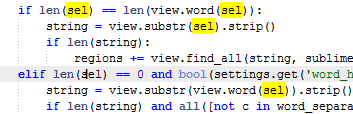 I love the feature of the e Text Editor to highlight all instances of the word that your cursor is currently on. This is a difficult feature to describe, but see in the screen capture to the right that I have my cursor on one instance of “sel” and all other instances of the word are highlighted in yellow.
I recently heard about the new version of Sublime Text 2, a text editor that promises to become “a text editor you’ll fall in love with.” It does not, however, have this feature that I have come to depend on in e. Luckily, as they are building this new version of Sublime Text, the development team is using User Echo to allow feature requests to be generated by the community. I found this feature in a request - Upon selecting a word, highlight all occurrences.